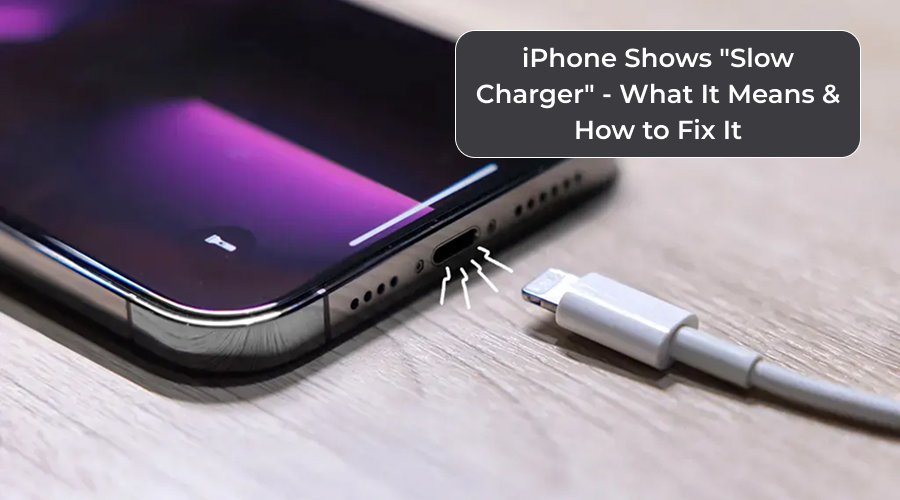
Are you frequently getting a “Slow Charger” alert on your iPhone? Worry not! You are not alone in this. There are many iPhone users encountering this issue. You must be having numerous questions, such as: “What does it mean?” Why am I getting this alert?” “How to fix it” and so on. This post covers everything you need to know.
In this post, we will walk you through what the “Slow Charger” alert means, why it shows up and how you can fix it instantly. So, without any further ado, let’s get started…
What Does “Slow Charger” Mean?
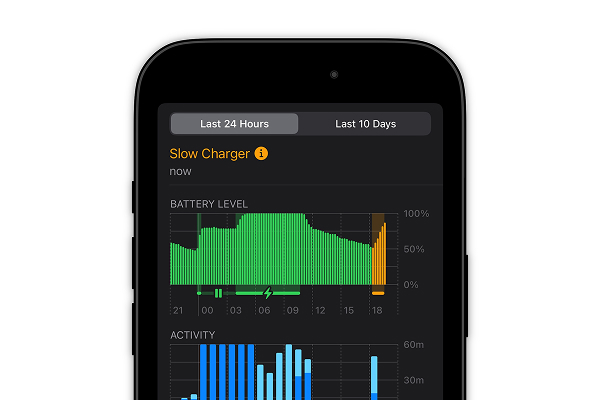
“Slow Charger” is basically Apple iPhone’s newest features that came along with iOS 18. Launched in 2024, iOS 18 includes numerous advanced features, including the ability to detect if your iPhone is charging slower than usual. If your phone often shows slow charger message than what it could be with a more capable charger, then you are advised to take prompt measures.
Well, there is nothing to worry about as Apple iPhone’s new feature does not indicate a fault or something broken. It simply implies that your iPhone needs a better and higher-wattage charger for an optimal charging setup.
How to Check “Slow Charger” Situation?
To know whether or not your charging setup is optimal, go to the ‘Settings’ of your system and check ‘Battery’ section. There you may see a message that reads “Slow Charger.”
You can also consider checking the battery-charging graph in the Battery section. There, you may see orange bars instead of the usual green during charging periods. It happens when the phone senses the current setup is slow.
Slow Charger is not a problem in literal sense. It is in fact a diagnostic feature that helps users recognize when they need to upgrade their charging hardware. Also, it helps users to know that the charger or the charging setup that they are using needs to be changed for optimal performance.
Why Does “Slow Charger” Warning Appear?
There are numerous reasons you may encounter this alert on your iPhone. However, knowing the reason can help you take proper measures in a timely fashion. Here are the reasons; take a look…
1. Low-wattage Charger
If you are using a low-wattage charger that the one required for your iPhone, then you may encounter this issue. Know that modern iPhones support fast charging. Hence, you should buy the right charger for your iPhone.
2. Not Using a Fast-Charging Adaptor
As said in the previous pointer, modern iPhones come with a fast-charging feature. Therefore, you are required to invest in a fast-charging adaptor that supports fast charging.
3. Using an Older Charger
If you are using an older charger for your new device, then again that’s a problem. Older charger, especially the ones that came along with older phones, deliver only 5 watts of charging power. They are not capable of charging fast-charging iPhones.
4. Third-Party Chargers
Low-cost third-party chargers are again a problem for iPhones. If you are using a third-party or subpar charger, then you are sure to encounter the Slow Charger alert.
5. Accessory Limitations
Cable or accessory limitation can also cause a slow charger issue. If the cable or accessories are weak, damaged or uncertified, they may not deliver enough charging current. This, in turn, triggers the slow charger feature.
6. Using USB Ports
If you are charging your iPhone using USB ports instead of wall outlets, then it may also trigger the Slow Charger feature. This is because USB ports or multi-device hubs often fail to supply enough current, leading to iOS detecting a slower charging issue.
7. Wireless Charging
Wireless charging methods also sometimes do not offer enough charging speed, causing Slow Charger message to appear. It usually happens when you use a wireless pad or accessory that isn’t optimized.
8. Battery Conditions
If your iPhone’s battery is old or under certain conditions, then you may also encounter the issue.
NOTE: Know that the “Slow Charger” message may not always explicitly state the battery issue. However, it will help you figure out the right reason.
Is the “Slow Charger” Warning Bad for you or your iPhone?
Users often get confused when the Slow Charger alert appears on their iPhones. But for your information, there is nothing to worry about it. It is not a sign of damage or malfunction. Even Apple has confirmed that “Slow Charger” is not a sign of any problem with your iPhone or charger. It only shows that your iPhone could achieve a faster charge with better hardware.
Also, slow charging is not a problem as such. It, in fact, can be gentler on the battery, benefiting the battery’s long-term health. If you prefer slower charging, then keep it that way. Don’t worry! However, if you want fast charging, then the best is to opt for a higher-charging setup for your iPhone.
Let’s now see how you can fix the Slow Charger situation. Here we go…
Top 8 Ways to Fix the “Slow Charger” Situation
If you want to get rid of the “Slow Charger” warning and boost charging speed, then here are the fixes. Take a look…
1. Use a Higher-Wattage Charger & Power Adapter
One of the best fixes for Slow Charger situation is to use a higher-wattage charger or power adaptor. iPhone 12 and later are designed with fast-charging capability. For these devices, you are advised to use a 30 W USB-C charger along with a high-quality USB-C to Lightning cable. Using a high-wattage charger will help you avoid the situation.
2. Use the Right and Original Charging Components
You should make it a habit to use the right components for charging your iPhone. Of course, you need to buy iPhone chargers separately and they come with a cost too. But at any cost, you should only opt for the original charging components.
3. Use the Right Cable
Cable also matters! Hence, it is essential to use a cable compatible with your iPhone model. Also, the cable you buy should be original or from a reputable brand. Also, check if it is not damaged, frayed or bent.
4. Avoid Using Weak Charging Outlets or Hubs
You are advised to use wall outlet for fast charging. As said earlier, weak charging hubs or outlets do not supply enough current, leading to slow charger situation.
5. Keep Your Charging Ports Clean
Sometimes charging ports catch dust or debris, causing slow charging. Keeping your charging ports clean can help you avoid slow charging situation.
6. Ensure the Hardware is in Good Condition
If your iPhone overheats pretty frequently, then you are advised to check your battery. If it is too old, then it’s best to change the iPhone’s battery or avoid using heavy-duty apps while charging.
Pro Tip: If you want your iPhone’s battery working excellent, then make it a habit to not leave it on charging for longer hours than required.
7. Keep Your iOS Updated
Apple keeps releasing the latest iOS updates. You are advised to keep your iPhone software up to date at all times. Doing so can help you avoid charging-related issues.
8. Don’t Fear ‘Slow Charger’ Alert
As we said earlier in this post, that Slow Charger alert is not a problem or a malfunction. Hence, you are advised not to fear the situation. In fact, accepting slower charging can help you have a peaceful time using your device. Slower charging may not be a problem, especially if you tend to charge your iPhone overnight.
Bottom Line
So, this is all about the iPhone “Slow Charger” situation. Hopefully, this article has been informative for you and helped you understand how you can fix the issue without any hassle. Fixes outlined in this post are workable and useful as well. If you see the Slow Charger as a big issue, then you are advised to follow the above-mentioned fixes.
Make sure to use a more capable charger and a high-quality cable. Also, you are advised to use wall outlets for maximum times and keep your software updated. If you are habitual of charging your phone overnight, then take “Slow Charger” easy.
Pro Tip: Avoid using your iPhone while charging, as it can impact your battery and cause Slow Charger message to appear. Moreover, if you experience charging-related issues pretty frequently, then you are suggested to get it checked professionally.