Spec sheets love modems. You get the chipset name, the 5G bands, the peak download speed and whether the phone supports dual SIM or eSIM. What they never mention is the IP address your phone ends up with once it connects.
That’s not an oversight. The IP address isn’t a property of the phone at all. Your carrier decides it, somewhere deep inside its network, every time your phone opens a data connection.
That small detail shapes a surprising amount of what you see in apps. It affects which country a streaming catalogue thinks you’re in and why a map app guesses the wrong city. It’s also why some apps throw a security check at you right after you leave the house. Here’s how it works, without the jargon overload.
Your phone doesn’t own its IP address
On home broadband, your router usually gets one public IP address from your provider. Every device in the house shares it, and it often stays the same for days or weeks. Mobile networks work differently.
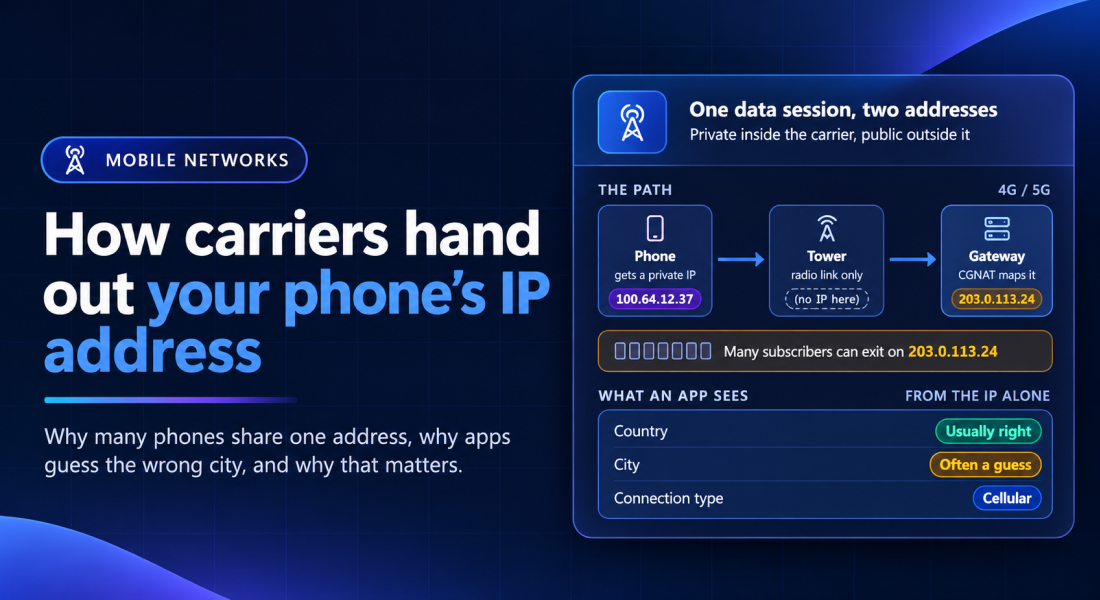
When your cell phone turns on mobile data, it asks the carrier’s core network for a data session. In 4G that request goes to a packet gateway. In standalone 5G, a session management function picks the address and a user plane function carries the traffic.
The names don’t matter much. What matters is that the address is handed out at the gateway, not by the cell tower you’re connected to. The tower is just the radio link, while the gateway is where your traffic actually meets the internet.
Your APN setting plays a part too. The access point name tells the carrier which gateway and which kind of service you want. Most people never touch it. Still, it’s one reason two phones on the same carrier can end up with addresses from different pools.
Why thousands of phones can share one address
There aren’t enough IPv4 addresses to give every phone its own public one. Carriers solved this the same way your home router does, just at a much bigger scale. It’s called carrier-grade NAT, or CGNAT.
Your phone gets a private address, often from a range set aside specifically for carriers, 100.64.0.0/10. The carrier’s NAT equipment then maps many of those private addresses onto a smaller pool of public ones. To a website, a large group of subscribers can appear to come from the same public IP.
You can see this yourself. Open a “what is my IP” page on Wi-Fi, then switch to mobile data and check again. The mobile address will usually be registered to your carrier, and it may not match anything your phone’s settings show you.
The address can also change without you doing anything. A dropped connection, a long idle spell or a move across the network can all land you on a new public IP. That’s why the old trick of toggling airplane mode often gives you a fresh address, though it isn’t guaranteed.
IPv6 changes the picture, but not completely
IPv6 has so many addresses that sharing isn’t necessary. On many networks, each phone’s data session gets its own IPv6 prefix. That gives the device a range of addresses it can use, rather than one address shared with strangers.
Some carriers have gone further and run IPv6-only networks. For older sites that only speak IPv4, the phone and the carrier translate traffic between the two. Your phone handles one half of that translation and the network handles the other.
So a single phone can effectively have two identities online. It may reach one site over its own IPv6 address and another site through a shared IPv4 address. Apps that only look at one of them can come to very different conclusions about who you are.
Why geolocation gets your city wrong
Location databases try to map IP addresses to places. For home broadband, they’re often close to the right city. For mobile connections, the results tend to be much rougher.
The reason goes back to the gateway. Your public IP reflects where your traffic leaves the carrier’s network, not where you’re standing. A carrier may run only a handful of these exit points for an entire country.
That’s why a weather widget can show a forecast from the wrong side of the region. It’s also why apps that care about precise location ask for GPS permission instead of trusting the IP. The IP gives a rough region, and the phone’s own sensors fill in the rest.
Roaming: why your apps think you never left home
Travel abroad on your regular SIM and you might notice something odd. Your apps still behave like you’re at home, with the same language, the same store and the same streaming catalogue.
That’s because roaming traffic is usually routed back through your home carrier. The local network carries the radio side, but your data exits to the internet from your home country. To most websites, you never boarded the plane.
Travel eSIMs can behave differently. Depending on how the provider is set up, your traffic might exit in the country you’re visiting or somewhere else entirely. If an app suddenly shows prices in an unexpected currency, this is often why.
Why apps care about all of this
To an app, the IP address is one of the first clues it gets about a request. It’s available before you log in, before any cookies load and before the app knows anything else about you. So apps use it for several quick decisions.
- Regional content. Stores, streaming services and news apps use the IP to pick a default country, language and catalogue. The connection type can influence what you’re shown, too.
- Security checks. A session that suddenly jumps from a home network to a mobile network can trigger extra verification. Some apps are relaxed about this, while others are strict.
- Rate limits. Services cap how many requests can come from one address. On a shared mobile IP, those limits are shared too, which can make them hit sooner.
- Ad measurement. Ad networks look at connection type and network to judge whether traffic looks like real mobile users. Mismatches can get impressions filtered out.
- Fraud scoring. Addresses from hosting companies and VPNs often get flagged as higher risk. Mobile carrier ranges usually get classified as a separate kind of connection.
CGNAT makes all of this harder. Blocking one shared mobile address can lock out many ordinary people who did nothing wrong. Better-built systems lean on other signals, like device and behaviour data, rather than the IP alone.
It doesn’t mean mobile traffic gets a free pass. Shared addresses can actually run into rate limits more often, because one noisy neighbour affects everyone behind the same IP. The honest summary is that mobile IPs are treated differently, not that they’re trusted more.
What this means for people who build and test apps
If you develop or test apps, carrier behaviour is easy to miss. Most testing happens on office Wi-Fi or in emulators. Neither tells you how your app behaves on a real carrier connection.
Plenty of bugs only show up there. A store page might default to the wrong country because the carrier’s exit point sits across a border. A landing page might load a different layout, or a mobile search result might look nothing like the desktop version.
Ad teams run into a similar problem. They need to confirm that a campaign targeted at mobile users in a specific market actually shows up there. Checking from a desktop browser on a fibre line won’t tell them that.
There are a few ways to see your product through a real carrier connection:
- Physical test phones with local SIMs. This is the most realistic option, but it gets expensive and awkward once you need several countries or regions.
- Shared rotating mobile proxy pools. These route requests through mobile connections in many locations. They’re good for broad checks where you want variety and don’t need the same IP each time.
- Dedicated mobile proxies. These give you a private connection on one carrier SIM inside a 4G or 5G modem. Nobody else uses it, so you aren’t affected by other customers’ traffic on the same line.
Which one makes sense depends on the job. Broad mobile search checks across many cities suit a rotating pool. Longer QA runs or monitoring sessions, where you want one consistent mobile identity, suit a dedicated line.
For a steady carrier connection, providers like ProxyEmpire offer dedicated 4G/5G mobile proxies built for mobile QA, app testing and ad verification.
The main advantage is control. With a dedicated modem, you decide when to request a new IP, instead of having it change underneath a test. The carrier still decides which address it hands out, so the same rules about CGNAT and geolocation still apply.
What to look for in a mobile proxy setup
If you go down this route, a few practical points matter more than headline numbers. Keep them in mind when comparing options.
- Real carrier connections. The connection should come from a SIM on a real mobile network, so IP databases classify it as cellular.
- Location coverage. Check that the countries and cities you actually test in are covered, not just the total number of locations.
- IP reset control. Find out how and how often you can request a new address, and whether you can pause changes during a long test.
- Bandwidth terms. “Unlimited” on mobile usually comes with a fair-use policy from the carrier. Read it before planning heavy workloads.
- Protocol support. Make sure your tools can connect, whether they use HTTP, HTTPS or SOCKS5.
The short version
Your phone’s IP address comes from your carrier’s gateway, not from the phone or the tower overhead. On IPv4, it’s often shared with many other subscribers through carrier-grade NAT. On IPv6, your phone may get a range of addresses of its own.
Apps read that address as an early clue about where you are and what kind of connection you’re on. Usually they’re right about the country and fuzzy about the city. When roaming, they may not notice you’ve left home at all.
None of this appears on a spec sheet, but it shapes how every app on your phone treats you. Next time an app asks you to verify yourself after you step outside, you’ll know the carrier probably just handed you a new address.