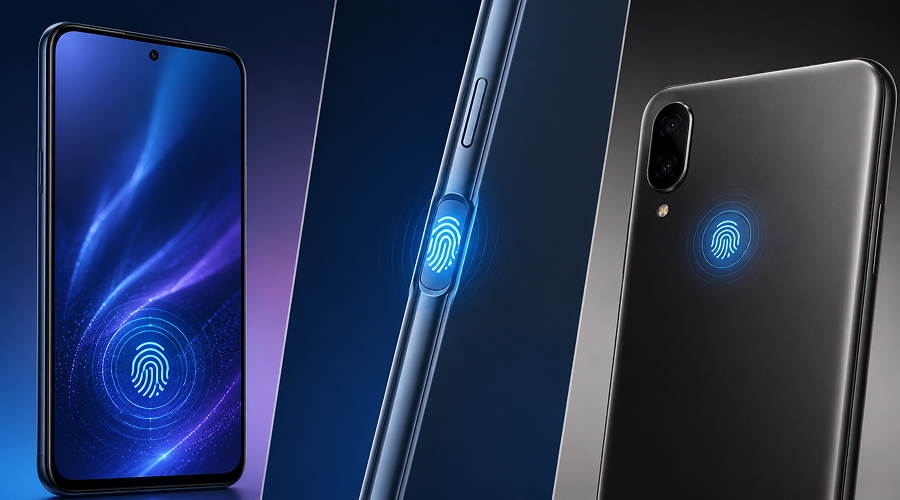
Fingerprint sensors have become an integral part of smartphones today. They make unlocking phones easy. Instead of entering a PIN or drawing a pattern, you unlock your phone by placing your finger on the sensor. But fingerprint sensors can perform differently depending on where they are placed on the phone. Some phones use an in-screen fingerprint sensor, others place sensors under the display or on the back.
Additionally, their placement affects unlocking speed, accuracy and performance in wet or cold conditions. If you want to know whether the in-screen fingerprint sensor is fastest and most reliable, read this post. Here, we have outlined the most significant differences between these three to help you make the right choice. So, let’s get started…
The Three Main Fingerprint Sensor Placements Explained
Here is how these three (in-display, side-mounted and rear-mounted) fingerprint sensors vary. Take a look…
1. In-Display Fingerprint Sensor
In-display fingerprint sensors are placed underneath the phone’s screen and are now common in many trending mobile phones. You need to put your finger on the marked area so that the sensor can read your fingerprint through the display. In-display sensors offer a clean design and they are of mainly two types, namely optical and ultrasonic sensors.
a. Optical Sensors
Optical fingerprint sensors use light to scan your fingerprint through the display. They are affordable and easy for manufacturers to integrate into smartphones. The main drawback is that the sensor has to see your fingerprint through the display. Water, dirt, dry fingers, or some screen protectors can sometimes affect their accuracy. Performance also varies from phone to phone.
b. Ultrasonic Sensors
Ultrasonic sensors, on the other hand send ultrasonic waves toward your finger and measure the returning signal instead of using light to capture an image. They are quicker and more reliable compared to optical sensors. They offer better accuracy and faster unlocking compared to basic optical sensors, even through the display.
However, performance can vary by phone, and some screen protectors may affect them. Their biggest advantage is a clean, button-free design.
2. Side-Mounted (Power Button)
Then there are side-mounted fingerprint sensors. They are often built directly into the phone’s power button, thus the name. Side sensors are often faster and easier to use. The side-mounted sensor is easy to reach when you pick up the phone, so you can unlock it quickly. Most use capacitive technology, which detects the ridges and valleys of your fingerprint, making it a practical option in a new launch mobile.
Speed is their biggest advantage and the reason is simple they sit around the most easily accessible area. A good side-mounted sensor can unlock your phone almost instantly the moment you press the power button.
Besides that, side-mounted sensors are also not affected by screen protectors because they sit outside the display. Side-mounted sensors are easy to access and work especially well on foldable and compact phones where an in-display sensor cannot be incorporated. The smaller sensor area means you need to place your finger correctly. It may also take some time to get used to, especially when using the phone with the opposite hand.
3. Rear-Mounted Fingerprint Sensors
Rear-mounted fingerprint sensors were very common in older smartphones. They are usually placed below the camera, where your index finger naturally rests. They are easy to find without looking and can unlock the phone quickly because they usually use capacitive technology.
However, rear-mounted fingerprint scanners have become pretty uncommon these days because modern smartphones come with larger displays and cleaner backs. This makes it difficult for manufacturers to incorporate these sensors. A rear-mounted scanner is less convenient when the phone is lying on a table because you need to pick it up first. However, it can be very comfortable for one-handed use.
Speed and Accuracy Comparison
When it comes to speed, these scanners vary greatly based on the design of the device. Besides that, the quality of the sensor and the phone’s software also matter. This is an important factor to consider when doing a phone comparison.
Side-mounted capacitive sensors are often considered speedier than the other two as they offer quick and consistent unlocking. Since your finger directly touches them, side-mounted sensors can read fingerprints quickly without scanning through the display. Good side-mounted sensors are often among the fastest options.
Rear-mounted capacitive sensors can also be very quick. But these are generally available only on some older or budget phones.
Optical in-display sensors can be slightly slower than physical sensors. Ultrasonic in-display sensors can be speedier than optical in-display sensors. They can even provide very fast unlocking while retaining the clean appearance of an in-screen sensor.
They can be simply ranked in this order based on everyday use:
- Number 1: Side-mounted capacitive
- Number 2: Ultrasonic in-display
- Number 3: Rear-mounted capacitive
- Number 4: Optical in-display
But that’s not a standard rule always. Sometimes, even a high-quality optical scanner can easily outperform a poorly designed side-mounted or ultrasonic sensor.
When it comes to accuracy, all of these types offer almost same level of accuracy. A good fingerprint reader recognizes your registered finger consistently. However, physical sensors can be more reliable because they read your fingerprint directly without scanning through the display.
Besides that, where you place your finger also matters. In-display sensors always have a specific spot where you need to place your finger. But a rear or side sensors are easier to spot by touch. Once you become familiar with its position, unlocking phone becomes much faster.
Reliability in Difficult Conditions (Wet Hands, Cold, Gloves)
That’s when the differences between these three fingerprint sensor types become more evident. Here is how they differ in difficult conditions; take a look…
1. Wet Hands
Wet fingers often make fingerprint scanners less accurate. This is because water affects how they read your fingerprint. Optical in-display sensors are more likely to struggle with moisture, while side-mounted sensors can handle slightly damp fingers better. Ultrasonic sensors can also perform better with wet fingers than basic optical sensors.
2. Cold Weather
Cold weather also causes problem with fingerprint sensors. It happens because your fingertips become dry during extreme cold weather, causing the skin and fingerprint ridges change slightly. This affects almost all fingerprint technologies to some extent. You can even face problems with capacitive sensors when fingers become extremely dry or cold.
However, physical capacitive sensors have generally become better at dealing with these changes through improved hardware and software. Cold weather and dry skin affect optical in-display sensors the most. If you live in a colder region, then a phone with a good side-mounted sensor may be a better choice.
3. Gloves
Even wearing gloves impact the fingerprint sensors. Wearing gloves prevent traditional capacitive fingerprint sensors from reading your finger. This is because these sensors read your fingerprint through direct contact with your skin. And the same happens with rear-mounted capacitive sensors as well.
Some ultrasonic sensors may work through thin materials, but they are not always dependable on every phone. So, if you tend to wear gloves, consider buying a device with face unlock or a PIN for an easy unlocking system.
Which Placement Works Best by Use Case
Here are the different use cases of in-display fingerprint, side-mounted and rear-mounted fingerprint sensors. Take a look…
- For the fastest unlocking: Choose a side-mounted fingerprint sensor. A good capacitive reader allows you to unlock the phone almost instantly as it does not depend on the display.
- For the best premium experience: Choose an ultrasonic in-display sensor. It offers a clean, full-screen design with better performance than many basic optical scanners.
- For budget phones: A side-mounted sensor usually makes the best choice. It provides quick and dependable performance without you having to pay flagship prices.
- For one-handed use: A side-mounted sensor is generally considered convenient for those who prefer one-handed use. This is because your thumb naturally rests near the power button. However, a rear-mounted sensor can be excellent if you prefer using your index finger while holding the phone.
- For people who use thick screen protectors: Side- or rear-mounted sensors come in handy in such a situation as they are less likely to be affected by the screen protector.
- For people who focus more on phone’s design: An in-display sensor is the best option in this situation as they avoid visible fingerprint button and gives the phone a cleaner design.
- For humid or frequently wet conditions: A good side-mounted sensor makes the best choice here. Besides this, even a high-quality ultrasonic in-display sensor can also perform well. Optical sensors are big NO as they are more likely to be affected by moisture.
The Bottom Line
So, this is all about the In-Screen Fingerprint vs Side-Mounted vs Rear-Mounted sensors. All of these make good choices depending on the type and design of your phone. Moreover, the choice of fingerprint sensors boils down to your personal choice. If you want speed, then surely, a side-mounted fingerprint sensor is a great choice.
However, if you are looking for a premium experience, then an ultrasonic in-display sensor stands out. Likewise, you need to understand exactly what you desire. Is it speed, reliability, consistency or convenience? Based on your personal preferences it would become easier to choose the right fingerprint sensors.