At their Worldwide Developers Conference (WWDC) on June 9, 2025, Apple announced that it will be releasing iOS 26 in the month of July. The developer beta was, however, made available within a few days after the announcement. The beta version was made available for registered developers.
The tech giant, however, plans to launch the public beta in July 2025 and the official stable version is expected to be launched around mid-September 2025. Recently, in a reply to a post on X, Apple watcher Mark Gurman said that the first iOS 26 public beta will be released on or around July 23. The best thing about iOS 26 is that it will include several hidden features and we are going to shed light on the same in the post. Read this post for deets. Here we go…
Before we move to the list of hidden features, let’s understand what iOS 26 is. Here we go…
What is iOS 26?
iOS 26 is the nineteenth and the newest Apple iOS operating system for the iPhone. The tech giant announced the release of iOS 26 on June 9, 2025, at Apple’s Worldwide Developers Conference (WWDC). The public beta of iOS 26 is expected to be released on or around July 23, 2025. The more stable version of the same will be released mid-September 2025.
iOS 26 is the direct successor to iOS 18. Although it is the nineteenth version of the iOS operating system, its version number was advanced to 26 in accordance with a newly announced policy of unified version numbers for Apple operating systems. These numbers are now aligned with the year following their release, similar to vehicle model years.
Devices That Can Run iOS 26
Devices and iPhone models that can run iOS 26 include iPhone 11 and all newer models, including the iPhone 11, 12, 13, 14, 15 and 16 series, along with the latest iPhone SE. This simply implies that all the iPhones that come with the A13 Bionic chip or newer will be compatible with the latest iOS version.

Aside from that, it will also run on iPads, MacBooks, and so on. The public betas of iOS 26, iPadOS 26 and macOS 26 will be made available in just a few days.
What else?
You must be wondering what’s so special about iOS 26. If so, continue reading the upcoming section…
iOS 26: What Makes It Stand Out?
The new iOS version includes numerous features that users will like for sure. The new features are designed to enhance user experience. Aside from MUST-HAVE features, the iOS 26 will also include hidden or lesser-known features, such as a customizable lock screen clock with adjustable size and widget placement, the ability to customize wallpapers from the home screen directly, custom snooze duration for alarms, new home screen animations, improved call screening, polls in messages, and so on.
The brand will be releasing public betas for the entire Apple ecosystem of popular devices, including iOS 26, iPadOS 26, macOS 26, tvOS 26, WatchOS 26, HomePod Software 26, and AirPods Firmware. This means that whether you use an iPhone or an iPad, you will be able to enjoy all the features effortlessly.
The coolest thing about the upcoming version of Apple’s iOS operating system is that anyone can sign up to be a member of the Apple Beta Software Program, which is also free. This will let you gain access to the public betas for testing. It is recommended that users create a backup of their device prior to installing the new software. It’s now time to take a look at the iOS features in detail. Here we go…
Best 30+ Hidden Features in iOS 26
Here is the list of over 30 lesser-known features that you are going to have in the upcoming version of the Apple iOS operating system. Take a look…
1. Ability to Make Liquid Glass Opaque
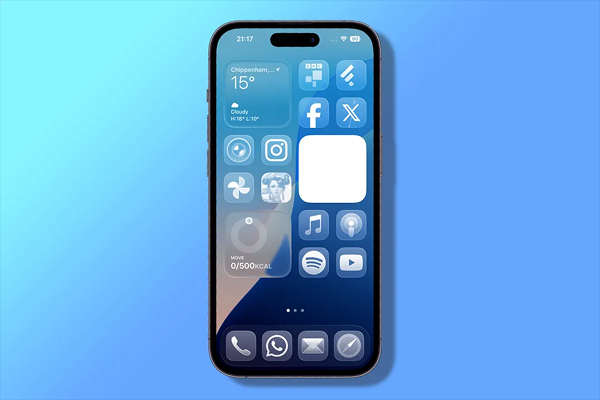
The upcoming version of iOS operating system will allow you to enhance the opacity of the glass design or remove the transparent and blurring effects in the Liquid Glass redesign. All you have to do is to navigate to the Settings app, select Accessibility, then go to Display & Text Size, and activate the Reduce Transparency option. It will allow you to maintain the glassy appearance of all icons and folders in iOS 26.
2. Customizable Clock
The iOS 26 will allow users to set the clock on the lock screen as they desire. Users would be able to resize and position the clock as desired.
3. Custom Snooze Duration for Alarms
Usually, an alarm could be snoozed for only 9 minutes. However, the newest iOS operating systems will allow you to customize snooze duration for alarms and have enhanced control. You would be able to adjust the duration between 1 to 15 minutes. All you have to do is to tap the alarm and choose the Snooze duration setting.
4. Spatial Wallpaper
With iOS 26, users would be able to apply 3D effects to wallpapers and make them look interesting and enticing. The 3D effects will add depth to the wallpapers. It is a fun new Photos feature that will take you 2D images to the next level by adding 3D feel to them.
5. Battery Drain Warnings
More often than not, users struggle with iPhone battery, especially if they use their phones heavily. But that won’t be the problem with the new operating systems. The upcoming Apple operating system will have a feature that will give you a battery drain warning. This way, you would be able to keep track of your phone’s battery health. The software will inform you when your battery appears to be depleting at an unusual rate, as well as identify the app responsible for it.
6. Battery Performance View
The new operating system will also have a Battery Intelligence feature. This will allow you to track battery usage. Navigate to Settings > Battery for a day and week view. It will also give you the details on the apps consuming the most power and allow you to manage background activity and location services for specific apps to optimize battery life.
7. Widget Customization
Widget customization is yet another wonderful feature that you will have in the new iOS 26. Now you will have the option to place the widgets at the bottom of the screen, which will allow you to have a cleaner look and easier access.
8. New Animations
During launching and shutting applications, as well as unlocking the device, subtle animations are incorporated, which result in a more smoothly flowing visual experience.
9. Ability to Keep Your Audio in Your Headphones
An interruption while listening to audio can be pretty frustrating. And it usually happens when you are on call. But now you don’t have to worry about it as the new iOS 26 will let you keep your audio in your headphones. This new feature will ensure that everything ceases to auto-connect to new devices. All you have to do is to navigate to Settings, then select General, and then click on AirPlay & Continuity, and tap on Keep Audio in Headphones and you are done!
10. Reset Home Screen Layout
The upcoming operating system will allow you to reset the home screen layout. You will be able to have clear, transparent icons by removing the background. To have a minimalist aesthetic, just go to Settings > General > Transfer or Reset iPhone > Reset > Reset Home Screen Layout and you’re done!
11. Enable Call Screening

You can now enable the call screening feature using iOS 26. It will allow you to automatically answer unknown callers, decide whether to pick up the call or not, and so on. The new feature will allow users to screen their calls, ask callers for their name and reason for calling before they can speak to the users.
You can enable screening just by going to Settings > Phone > Calls from Unknown Numbers and toggling on “Screen Incoming Calls.” The new call screening will allow users to have immense peace of mind.
12. Hold Assist
There is a Hold Assist feature in the new iOS 26. It will wait for a live agent on your behalf, sparing you from the irritation of listening to hold music. Yes, the phone app will now wait on hold for you, notifying you when a live agent is available.
13. Polls in Messages
Creating polls within the messaging app will be easier than ever with iOS 26. Yes, iOS 26 will let you create polls within group messages and easily gather opinions and make decisions. Go to iMessage group chat, click on the plus button, and select “Polls.” After that, you can enter your question-and-answer options.
14. New Focus Mode Upgrades
Most people these days prefer having two or more SIMs for work, personal connections, and so on. However, carrying separate devices is yet another task. But that won’t be a problem if you have iOS 26. It will have a Focus Mode feature that will allow you to assign Focus modes to individual SIMs on your device. For instance, you can mute work calls when you’re not at work or mute personal calls when you are at work. Go to Settings, and then Focus to set up the Focus mode.
15. Battery Charging Time Estimation
This is yet another wonderful hidden feature that will let you know how long it will take for your phone to fully charge. The charging time estimation will be displayed on the lock screen itself. Aldo, you can check it by navigating the Settings and then the Battery section when the device is plugged in.
16. Backgrounds in Messages
The new iOS 26 will allow you to personalize conversations with custom backgrounds. You would be able to choose from built-in options or personal photos. To use custom backgrounds in Messages, you will have to go to the Messages app, select a conversation, click on the contact or group name at the top, then choose “Backgrounds.” You would be able to select a photo, color, or use Image Playground to generate an image, or choose from preset options as well.
17. Live Translation
iOS 26 will also have a live translation feature that you can use while chatting. This means that if you are chatting with someone who speaks a different language, you would be able to translate the conversation while chatting. You will have to use a third-party app to enable live chatting features in iOS 26.
18. Apple Music Translation Feature
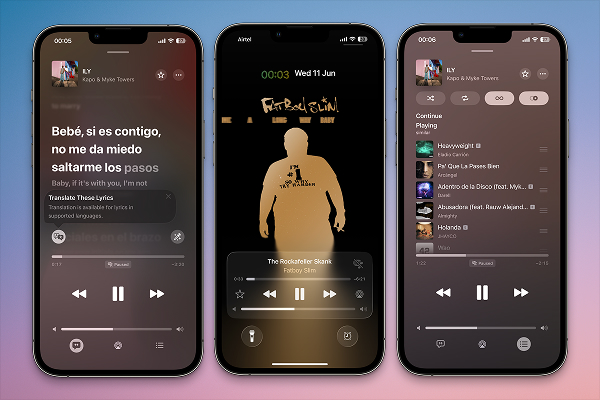
Lastly, you will have access to the Apple Music Translation feature with iOS 26. This new feature will allow you to see real-time translations of the lyrics that are in different languages. To enable this feature, go to Settings, then tap Music, then go to Lyrics, then click on Larger Text for Lyrics and enable the “Pronunciation” feature.
Aside from providing lyrics’ translations, this feature will also help you pronounce lyrics. You will have plenty of fun with this feature even when listening to songs in another language.
19. Screenshot Editing
Here is another great feature that you will enjoy with iOS 26. Improved screenshot editing will allow you to refine captured images using the undo and redo buttons. To enable Screenshot Editing in iOS 26, you need to go to Settings > General > Screen Capture and toggle on “Full-Screen Previews”. Doing so will display a full-screen preview of your screenshot immediately after taking it and allow you to access the editing options.
20. Adaptive Power
Adaptive Power is yet another useful feature in iOS 26. It is specifically designed to help extend battery life when you need it the most, such as when you are editing your video online, using maps, or maybe doing something more important and have no access to power. It includes reducing brightness or slowing down some apps so that you can use the saved power elsewhere.
21. Dirty Lens Warnings
A dirty lens can really spoil your picture. But not anymore! The nineteenth iOS version will warn you before your picture gets ruined. It will warn you that your camera lens needs cleaning. You will get an on-screen prompt while you are using your camera or capturing an image.
22. Album Artwork
In iOS 26, album artwork will now be full screen on the Lock Screen to allow you to play songs from Apple Music, Spotify, and other services. All you have to do is to play a song in the Apple Music app, lock your iPhone, and then tap on the album art in the lock screen’s music player to enable full-screen animated album artwork.
23. Search Apple Wallet
iOS 26’s new search Apple Wallet feature will allow you to find exactly what you are looking for. This feature will allow you save a lot of time as you won’t have to keep looking for your credit card or your ID while looking for it.
24. HEIF Screenshots
iOS 26 will let you save all your screenshots in the HEIF format, while screen recordings will utilise the HEVC codec. These formats are similar to those used for photos and videos captured by the iPhone camera.
25. Visited Places Feature in Maps
With iOS 26, users will be able to track all the locations they have visited in the Maps app. In the Maps app, there will be a new Visited Places feature. It will allow you to keep track of your visited locations so that you can revisit those places or find restaurants effortlessly without spending much time locating them again. For instance, you recently visited a new eating joint and now you wish to revisit it, but somehow you forgot its name. Don’t worry! The new feature will allow you to recall the name just by checking it in the Maps app and you can visit it again.
26. Visual Intelligence
This new feature will allow users to search, ask questions, and take action with content on their iPhone screen.
27. New Keyboard
A new keyboard is also introduced with iOS 26. You will be able to get the new keyboard from Apple apps for an enhanced keyboard experience.
28. Math Notes in Notes App
Now solving math equations will be much easier than ever with iOS 26. Yes, now you will be able to solve math equations with the Notes app just by entering the equation there.
29. Visual Intelligence
In iOS 26, you will also get Visual Intelligence that will work with screenshots. This will help you ask ChatGPT questions about what is on your screen or may search for items in screenshots on Google using the visual intelligence feature.
30. Apple Music AutoMix Feature
For music lovers, iOS 26 will be introducing the AutoMix feature in Apple Music. AutoMix will help you seamlessly move from one song to another with time stretching and beat mixing. It’s like having a DJ with you all the time. To enable this feature, go to the Apple Music app and start playing a playlist or album, then tap the now playing screen, locate the Automix toggle within the playback settings and turn it on.
31. All-New Games App
There is something for everyone in iOS 26, including online gamers. The new iOS 26 will have a new Games app where you can save all your mobile games. It will make finding new games easier for users. Also, it includes Game Center functionality and features that will allow you to challenge your friends.
Ending Note
So, these are the hidden and most important features that you will get to see in the upcoming iOS 26. Aside from that, there will be more features that you are sure to enjoy. Apple has designed the new iOS 26 keeping the user experience in mind. Apple users are going to have an enhanced experience with their device now on.
However, it is crucial that you have an iPhone 11 or higher version to take advantage of all these features that are included in iOS 26. If there are hidden feature(s) that we have missed here, please feel free to let us know in the comment section below.