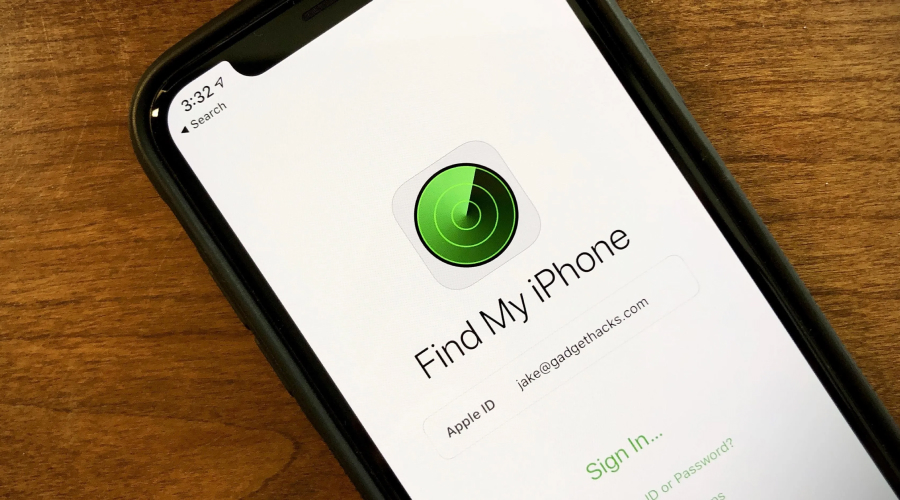
Apple’s Find My will even track your powered-off iPhones with its low energy hardware, encrypted Bluetooth signals, and a global relay of nearby Apple devices. We explain the basics behind this tech that make offline tracking possible.
When you lost a smartphone, the moment the battery died, or service went off, tracking stopped. This meant countless heartbreaks. Apple broke that assumption. Modern iPhones can still report their location after shutdown, and that too without draining power or exposing user identity. Sounds magical, and it is. It relies on deliberate hardware design that works on low energy radios in a privacy first network that operates quietly in the background.
If you have the latest iPhone, we explain how Apple’s updated Find My system will help you find your lost iPhone when it appears off. Here’s everything you need to know.
How does power off work with the modern iPhones
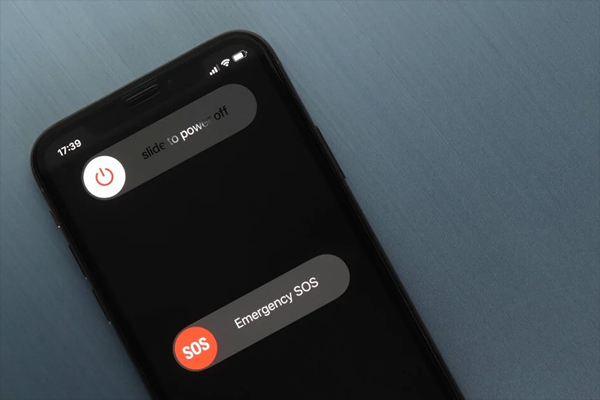
Newer iPhones do not become electrically dead when turned off the normal way. Starting with the iPhone 11, Apple redesigned its power architecture to allow certain components to remain active in an ultra low power state. In this mode, the main processor turns off and all the user facing functions stop entirely. It is only a small subsystem that continues running. This powers the Bluetooth Low Energy (BLE) and the Ultra Wideband (UWB) chip, drawing only a tiny amount of energy from the battery. Apple treats this state as “findable,” not fully offline.
You can see evidence of this behaviour when powering down a supported iPhone. The shutdown screen states that the device remains findable after powering off.
The Find My network
➢ A crowd sourced location mesh
Apple doesn’t track powered-off iPhones through GPS or cellular. Instead, it relies on its Find My network. Think of this as a massive mesh of Apple devices already in the wild.
Every iPhone, iPad, Mac, and Apple Watch that is activated on the Find My network can detect the Bluetooth signals from nearby lost devices. When a nearby Apple device encounters a lost iPhone broadcasting its identifier, that device starts acting as a relay.
It encrypts the location data and sends it to Apple’s server. This is how the location of the lost device becomes available to the owner — and you can Use Find My to locate your lost Apple device even when your iPhone is offline.
The relay device never learns whose iPhone it helped locate. It does not see an Apple ID, a phone number, or even a name.
➢ Encryption by design
This system was designed by Apple in a way that only the owner of the device can decrypt the location data. The lost iPhone emits rotating cryptographic identifiers and these change continuously so third parties cannot track it.
Apple’s own server too cannot read the location contents. They only store encrypted blobs and pass them along to the authenticated owners. Even Apple cannot reverse the encryption without the private keys stored on the owner’s device.
Which devices are supported
In order for offline tracking to work, your iPhone needs specific hardware. Apple introduced all the necessary components starting with the iPhone 11 lineup.
➢ Ultra Wideband and Spatial Awareness
The UWB chip gives supported iPhones precise spatial awareness at short range. While UWB mainly improves close range finding like showing distance and direction, it also enables efficient, low energy signalling. Combined with Bluetooth Low Energy, it allows an iPhone to advertise its presence without waking the main system.
Older iPhones do not have this architecture inside so models before the iPhone 11 will not be findable after they are turned off. Apple also excludes the 2020 and 2022 iPhone SEs from this feature despite having newer release dates.
How a powered-off iPhone shares its location
Step 1: Low energy broadcast
After shutdown, the iPhone periodically emits a Bluetooth signal using a rotating encrypted identifier. This signal contains no readable location data on its own.
Step 2: Nearby Apple devices detect the signal
Any Apple device passing within the range can detect this broadcast. The detecting device calculates its own location using GPS, Wi-Fi, or cellular data.
Step 3: Secure relay to iCloud
The detecting device then will encrypt the location and identifier together and upload them to Apple servers. This process happens automatically and consumes minimal bandwidth.
Step 4: Owner retrieves the location
When the owner opens the Find My app or signs into iCloud, their device decrypts the stored data and displays the location on a map. The owner sees the last known position of the lost device, even if the iPhone has been powered off.
What is the “Send Last Location” feature
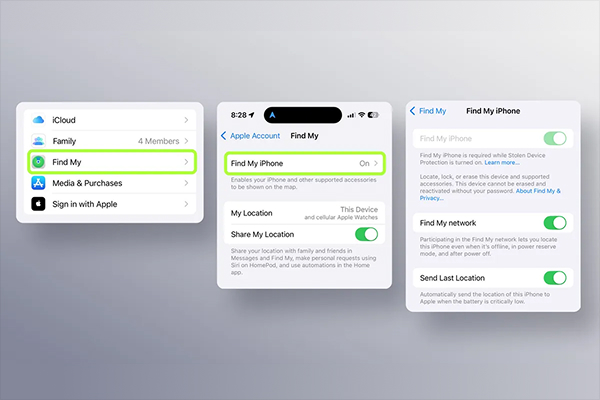
Before shutdown, the iPhone may send a final location when the battery levels drop critically low. This feature captures a GPS based location instead of a relay based one. Apple then stores this data separately and uses it when the device has stopped communicating entirely. This mechanism offers a clear last checkpoint that helps when the device enters an area with very few Apple devices nearby.
Why location can sometimes disappear
Find My does not guarantee continuous tracking. There are a few conditions that can interrupt this visibility.
➢ Time limits apply
If an iPhone fails to communicate with the Find My network for more than seven days, Apples stops displaying its location. The system prioritises privacy over indefinite storage.
➢ Environmental gaps matter
Offline tracking depends on proximity to other Apple devices. A powered off iPhone left in a remote area, underground area, or sealed container may not encounter any relays.
➢ Location services still matter
If location services malfunction before shutdown, the Find My network cannot recover accurate position data. Relay devices report their own location, not the lost phone’s internal GPS reading.
Lost mode and theft protection
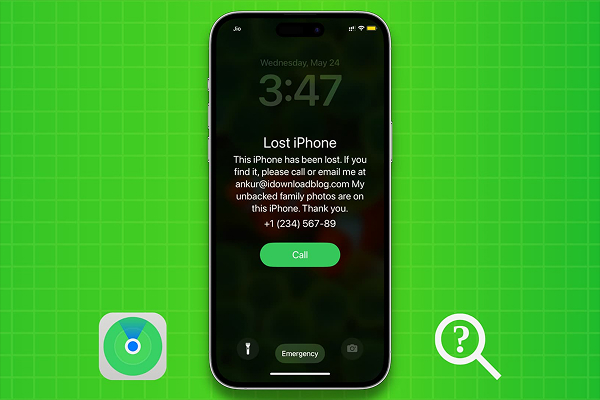
➢ Lost mode locks more than the screen
After the owner marks an iPhone as lost, Apple locks the device immediately and suspends all Apple Pay credentials. Plus, it also restricts sensitive account actions. The phone still remains traceable.
➢ Stolen device protection adds another barrier
Apple introduced Stolen Device Protection to counter targeted theft scenarios. This is an amazing feature that enforces biometric authentication for critical account changes, even if a thief knows the passcode. It also delays sensitive actions when the device appears in an unfamiliar location.
How is Apple’s tracking approach different
Apple chose a path that avoids central tracking databases and persistent identifiers. Find My was not built as a way to monitor users. It was meant to be a safeguard. Every design choice reflects a bias towards user control and privacy. The system works flawlessly because millions of devices participate in a private ecosystem.
And when this approach is scaled globally, density powers the entire network.
The limits of powered off tracking
An iPhone cannot broadcast its location forever. The reserve power budget lasts for a limited time. This is typically several hours to a day after shutdown. But this also depends on the battery health and usage. Once the reserve drains, all the signals stop. Find My also cannot override physics. Shielding, distance, and interference still apply. The system increases recovery odds, not certainty.
Final thoughts
Apple’s ability to locate a powered off iPhone relies on international engineering choices that keep a sliver of the device alive even after it has been shut down. Apple redefined what it meant to be offline. The result feels seamless to users, but under the surface, it reflects one of the most sophisticated consumer privacy architectures in active use today.
Losing an iPhone still will feel stressful but the difference now lies in what happens next.